
Docs User guide
Visual effects
Effects on objects, around them and under them, built from their voxels, and over the whole screen.
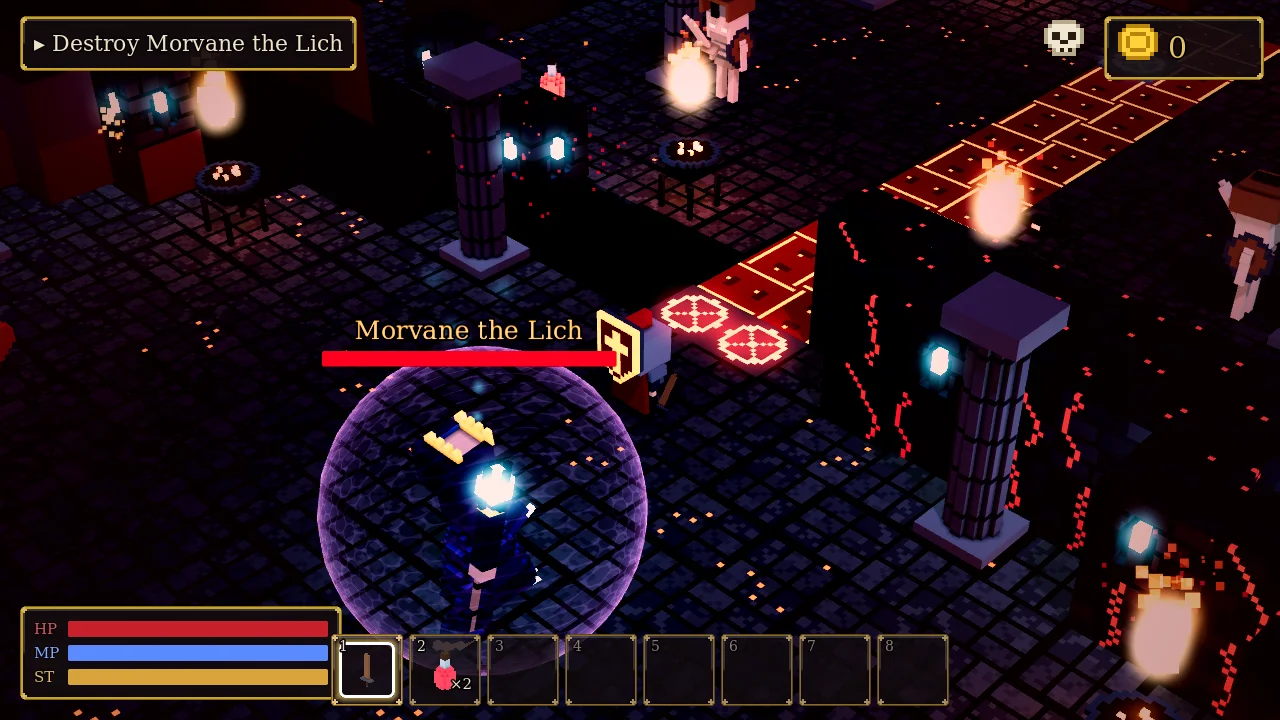
Effects that change how things look while you play: on an object's surface, around it, on the floor under it, built from its voxels, or over the whole screen. Everything here is a behavior, an action, a cutscene step or a line of Quick code, with sliders instead of shader code. It all works on every renderer, the web build too. Lichgate Depths uses most of them.
#The Visual effect behavior
Add it from Add behavior ▸ Looks ▸ Visual effect. Pick an Effect, then:
- Color: empty uses the effect's own color.
- Strength: 0–1. For Frozen and Turned to stone it's how far up the effect climbs; for Dissolve it's how much is gone.
- Speed.
- Size: tiles, for effects around the object or on the floor.
- Swap to: the new color for Swap one color.
- Only while switch is on: empty means always.
An object can have several Visual effects at once, for example Frozen plus a Magic circle under it, or Pulse glow plus a Shield. Only one surface effect applies at a time, the first one listed. Effects that are always on also show in the World view while you build.
On its surface
| Effect | Looks like |
|---|---|
| Pulse glow | Everything breathes light, glowing colors most |
| Rune wave | Its glowing voxels light up one after another |
| Hologram | See-through light with moving scanlines and a flicker |
| Ghost | Pale and see-through with a bright rim, drifting up and down |
| Cloaked | Almost invisible: only a shimmering edge |
| Shadow form | Dark, with a glowing rim |
| Iridescent | An oil-slick rainbow that changes with the angle |
| Gold / Chrome | Shiny metal, a shine sweeping across |
| Glitter | Voxels catch the light and sparkle |
| Frozen | Frost and ice climbing from the feet |
| Turned to stone | Gray stone climbing from the feet |
| Burning embers | Charred, with embers flickering, worst at the bottom |
| Wet | Darker and glossy, drips running down |
| Rusted | Orange-brown patches |
| Poisoned veins | Veins pulsing under the surface |
| Flowing light | Bands of light running across it (lava, energy) |
| Scan line | A bright line sweeping up, again and again |
| Heartbeat | A double beat of color |
| Rainbow | Its colors cycle through the hues |
| Tint | Recolored in one color, keeping its shading |
| Swap one color | One color becomes another (team colors, a damaged stage) |
| Grayscale | Drained of color |
| Dissolve | Voxels gone (Strength = how much), glowing at the edge |
| Jelly wobble | Squashes and jiggles |
| Glitch | Bands jump sideways, colors split |
Around it
| Effect | Looks like |
|---|---|
| Heat haze | The view behind it ripples (fire, lava, portals) |
| Black hole | The view bends toward a dark core with a glowing ring |
| Shield bubble | A see-through bubble with a bright rim and hex pattern, at least as big as the object |
| Light shaft | A soft beam of light coming down from above |
| Floor fog | Low drifting mist |
| Glow halo | A soft halo of light |
On the floor: Scorch mark, Splat, Magic circle (glows and turns slowly), Cracks and Soft shadow, all Size tiles across.
#Voxel effects
These play once and are built from the model's own voxels, in its colors. Use the Voxel
effect action, the cutscene step of the same name, or obj.voxel_effect().
- Assemble: the voxels fly in from around it and build the model, bottom first.
- Dissolve: the voxels lift away, glowing and shrinking, top first. Afterwards the object is hidden.
- Sand: it crumbles from the top down into a pile that shrinks away. Afterwards the object is hidden.
- Morph: the voxels fly from this model's shape into another model's, which it looks like from then on (its collision stays its own).
- Shockwave: a ring of glowing cubes bursts out across the floor, with a zoom kick.
- Pop in / Pop out: it grows from nothing with a bounce, or shrinks away and hides.
Breaks apart has two new styles that use these: Dissolve and Sand. A destroyed enemy melts into its voxels, glowing in its Visual effect's color.
#The screen
Screen mood behavior (Looks): near the object, the whole screen takes on a look. It fades in as the player comes within Range and out as they leave, and can be limited to while a switch is on.
Screen look action, screen_look(), or the cutscene step Screen look: a look until
changed, or for a number of seconds. none goes back to the level's own.
The looks: red alert, poison, cold, flashback, nightmare, drunk, night vision, thermal, horror, dream, noir, sepia, toxic, underwater, heat, old film, retro TV, arcade CRT, retro dither, comic, diorama.
A level's own Post Effects (Properties) have the new looks as presets, plus sliders for Old monitor (CRT), Dither, Glitch, Night vision, Thermal, Invert colors and Zoom blur.
Screen effect action (for a moment): flash, blur, split, black & white, wobble, plus the new zoom, glitch, pixelate, drunk, night vision, thermal, invert, slow motion (the game slows to a quarter and comes back) and lightning.
Screen transition action / transition(): covers the screen and uncovers it again in a
style: fade, wipe, iris, diamonds, pixel dissolve, voxel blocks or curtain.
Game Settings ▸ Graphics ▸ Screen transition picks the style doors and being defeated use.
#Weather and lightning
Properties ▸ Weather adds Embers (glowing sparks rising), Ash, Petals and Sparks. Lightning (0 = never) sets how often lightning flashes the screen, with thunder.
#Quick code
object("statue").effect("frozen", "", 0.6)        -- frost two thirds of the way up
self.effect("shield", "#b88aff", 0.8, 5)           -- a shield for 5 seconds
self.effect("off")                                 -- none; effect("auto") = back to its own
object("crate").voxel_effect("dissolve")
object("egg").voxel_effect("morph", "Dragon", 2)
screen_look("night_vision")  screen_look("none")
screen_effect("slow_motion", 1.5)
transition("iris", 1)#Graphics settings
Game Settings ▸ Graphics ▸ Visual effects: Simple leaves out the effects that read the screen (Heat haze, Black hole) for slow computers. Everything else stays.